
How to Maintain Character Consistency Across AI-Generated Scenes

How to Maintain Character Consistency Across AI-Generated Scenes
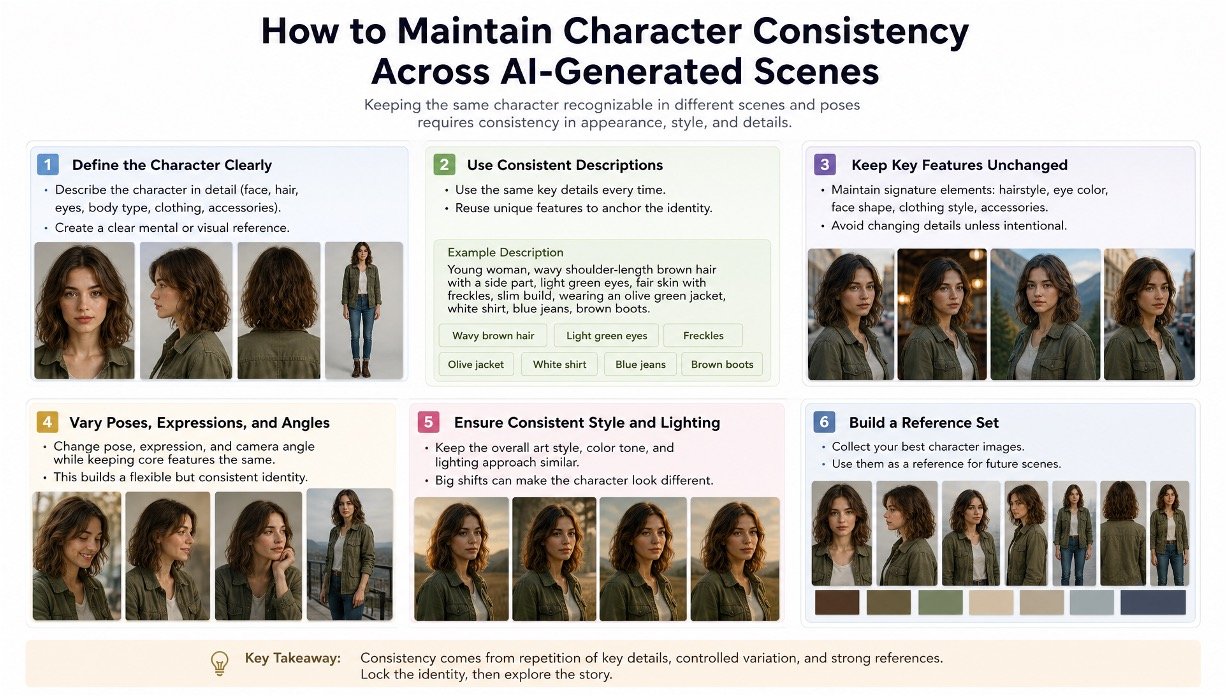
A character that looks like a slightly different person from scene to scene is the fastest way an AI-generated video reads as AI-generated. The eyes are a touch wider. The jawline softened. The outfit’s color shifted half a shade. None of it is a dramatic failure on its own, but stacked across ten scenes it stops feeling like a performance and starts feeling like a slideshow of similar-looking strangers.
This isn’t a rare glitch, it’s the default outcome of generating each scene independently, without a shared reference the model can return to every time the character appears.
Why character drift compounds instead of staying constant
A video model has no memory between generations. Every new scene is, technically, a fresh attempt at reconstructing the character from whatever context it’s given, a text description, a single photo, or nothing at all. Small deviations that would be invisible in one image become visible the moment two images sit next to each other in the same sequence, and the deviations don’t reset between shots, they accumulate.
invideo agent addresses this the same way professional continuity departments do it on a physical set: by locking a reference at the start and holding every later shot to it, rather than letting each scene reinterpret the character from scratch.
Start with more than one photo
A single reference image tells a model what a character looks like from exactly one angle, in exactly one lighting condition, wearing exactly one expression. That’s not enough information for a model to reconstruct the character correctly once a scene calls for a three-quarter turn, a profile shot, or a different emotional beat.
Best AI Tools for Matching B-Roll to Live-Action Footage
A real reference sheet needs multiple angles, front, three-quarter, profile, and ideally a back view, plus a close-up on the face specifically. Each angle gives a model a different piece of the character’s actual three-dimensional structure, which is what lets it generate a believable new angle later rather than guessing.
Describe defining features precisely, not generally
“A woman in her thirties with brown hair” gives a model almost nothing to hold onto across multiple generations, since thousands of faces satisfy that description. The features that actually anchor a viewer’s sense of “this is the same person,” a specific jaw shape, a particular gap between the eyes, a scar, an asymmetry, need to be named directly rather than implied by a general description.
This is the same principle that separates a strong product reference from a weak one: vague input produces a model’s best statistical guess, which drifts every time, while specific input gives it something concrete to reproduce.
Lock the first appearance before generating anything else
Once a character’s reference sheet exists, the first scene that character actually appears in sets the standard every later scene needs to match. This is where a persistent context engine matters most: invideo agent can hold that first locked appearance in memory across an entire project, so every later scene inherits the character’s exact look automatically, rather than reinterpreting them independently each time a new scene calls for them.
12 Best AI Tools for Creating Cinematic Shots With Advanced Camera Control
Skipping this step, treating each new scene as its own fresh generation instead of a continuation of a locked identity, is one of the most common reasons a character looks noticeably different by the middle of a project even when the early scenes looked fine.
Handle multi-character scenes as their own separate problem
Two characters, each individually locked and consistent on their own, can still blur into each other the moment they interact in the same frame, a handshake, an embrace, standing close together. Each character’s reference was built in isolation, so a model generating both at once in physical contact has no established sense of how they should relate to each other spatially.
The practical fix is treating that interaction as its own reference case: sketching the physical arrangement, who’s on which side, how they’re touching, and generating a single fused reference for that exact configuration, rather than expecting two independently locked characters to combine correctly on their own. This is one of the areas where invideo agent’s approach differs from a single-reference tool, since the platform can take a rough, hand-drawn blocking sketch and turn it into one combined reference sheet for that specific interaction.
Let the routing layer handle which model renders which scene
A character doesn’t only need to survive different angles and expressions, it needs to survive being rendered by different underlying models across a project, since no single generative model is the best fit for every kind of scene. invideo agent routes each scene to whichever of its 200+ integrated models fits that particular moment, including Veo 3.1, Sora 2, Kling 3.0, Seedance 2.0, Runway, PixVerse, Hailuo, WAN, Recraft, GPT Image 2.0, and Nano Banana, while the character’s locked reference sheet applies regardless of which model actually generates a given shot.
10 AI Filmmaking Tools for Better Characters, Audio, Camera Moves, and More
That matters because a character’s consistency shouldn’t depend on sticking to one model for an entire project. A dialogue-heavy scene might call for one model’s strength, an action sequence another’s, and the character needs to look like the same person across both.
Common mistakes when maintaining character consistency
- Working from a single reference photo instead of a full angle set. One image can’t tell a model what a character looks like from a different angle, which is exactly when drift shows up first.
- Describing a character generally instead of naming specific, defining features. A vague description produces a different statistical guess every time; specific, named features give a model something concrete to hold onto.
- Treating each new scene as an independent generation. Without a locked first appearance as the reference point, small inconsistencies accumulate scene by scene until the character is noticeably different by the project’s midpoint.
- Assuming two individually consistent characters will combine correctly in the same frame. Multi-character interaction needs its own reference, built around the specific physical arrangement, not two separately locked identities layered together.
- Switching between generative models without carrying the character’s reference along. A character locked for one model’s output doesn’t automatically transfer if a later scene switches to a different underlying model without that reference following it.
Frequently asked questions
Why does character drift get worse the longer a project runs? Because every generation is technically independent, with no built-in memory of what came before. Small deviations don’t cancel out between scenes, they accumulate, which is why a character can look fine for the first few scenes and noticeably different by scene fifteen without any single generation being obviously wrong.
How many reference images does a character actually need? At minimum, a front angle, a three-quarter angle, a profile, and a close-up on the face. A back view helps for any shot involving the character turning away from camera. One photo alone typically isn’t enough once a scene calls for an angle the reference didn’t cover.
09 Free AI Kissing Video Generators
Why is it harder to keep two characters consistent when they’re interacting than when they’re each generated alone? Because each character’s reference was built in isolation, with no established sense of how the two should relate spatially once they’re in physical contact. A handshake or an embrace needs its own reference specifically built around that interaction, not two independently locked characters expected to combine correctly on their own.
Does a character need to stay locked to one AI model throughout a project? No, and it usually shouldn’t. Different scenes are often better served by different underlying models, dialogue, action, and stylized sequences each have different strengths among available models. What matters is that the character’s locked reference carries across that routing, rather than the character being tied to whichever single model started the project.
What’s the single most common reason a character looks inconsistent across an otherwise well-produced project? Skipping the first-appearance lock. Once a character’s initial scene is treated as just another independent generation rather than the reference every later scene needs to match, small inconsistencies compound with no anchor pulling them back.
